T3 Code Integration
Add an LLM Gateway provider to T3 Code, choose a model, and verify the connection with a real coding task.
T3 Code is an open-source desktop, web, and mobile interface for the coding agents installed on your machine. It does not call models itself: it drives Claude Code, Codex, OpenCode, and other agents. Point one of them at LLM Gateway and every thread you start in T3 Code runs on the model you choose from the catalogue.
This walkthrough was verified with T3 Code 0.1.11 and Claude Code 2.1.329: the agent read a TypeScript project, fixed a function, and ran its tests with glm-5.2 through LLM Gateway.
Video walkthrough
Prerequisites
- Install T3 Code from the download page or with
brew install --cask t3-code. To try the server and web app once without installing, runnpx t3@latest. - Install Claude Code using the Claude Code setup instructions, then check
claude --version. It is the agent this guide configures, and it needs no Anthropic login here. Codex and OpenCode are covered at the end. - Create an LLM Gateway API key, or use a DevPass plan key.
Add an LLM Gateway provider to T3 Code
In T3 Code, each configured agent is a provider instance. Add a Claude instance that only talks to LLM Gateway.
On first launch, T3 Code shows a welcome page with the agents it found. If no agent is ready, click Start without an agent; otherwise click Start. Then:
- Open Settings → Providers and click Add provider.
- Choose Claude, then click Next.
- Set Label to
LLM Gatewayand click Next. - Set the
CLAUDE_CONFIG_DIRpath to~/.claude_llmgateway, then click Add instance.
The separate config directory keeps this instance apart from any Anthropic login and conversation state in your default Claude Code setup. T3 Code's Claude provider documentation covers multiple accounts, launch arguments, and remote machines.
Set the endpoint and key
Select the new instance, scroll to Environment, and click Add variable for each of these:
| Variable | Value |
|---|---|
ANTHROPIC_BASE_URL | https://api.llmgateway.io |
ANTHROPIC_AUTH_TOKEN | Your LLM Gateway API key |
ANTHROPIC_API_KEY | Add with an empty value |
Use the base URL exactly as shown. Claude Code adds /v1/messages itself. The empty ANTHROPIC_API_KEY stops an Anthropic key in your environment from overriding the LLM Gateway key.
Values are sensitive by default: T3 Code stores them separately and shows Stored secret instead of the value afterwards. Leave the key sensitive. For the other two, click the lock next to the value first, so they are saved as plain text and stay readable, as in the screenshot below.
The instance status changes to Authenticated · Custom API endpoint once the base URL is saved. The status does not check the key, so a wrong key only fails when you send a message.
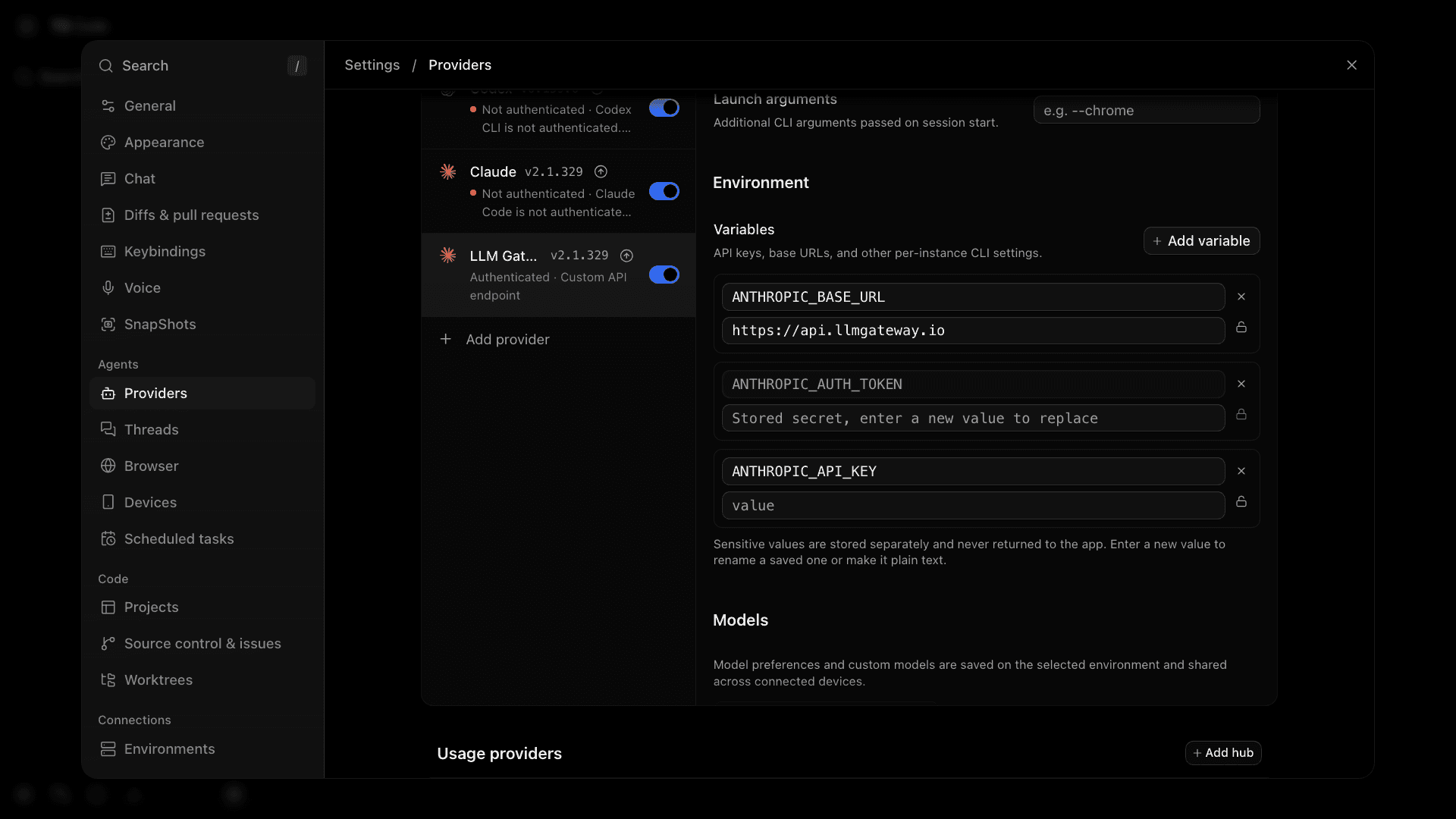
The default Claude instance can stay signed out. A thread uses the instance whose model you select.
Choose a model
T3 Code sends its built-in Claude models by ID. In T3 Code 0.1.11, 13 of the 14 built-in IDs exist in the LLM Gateway catalogue, and Claude Haiku 5.5 passed the task in this guide without further setup.
For any other model, or a built-in one that LLM Gateway rejects as unsupported, scroll to Models in the same instance, click Add custom model, and enter the exact ID from the tool-capable models list, for example glm-5.2. Custom models can have fewer effort and thinking controls than the built-in ones.
Using DevPass? Use a canonical model ID without an upstream provider prefix, and choose a model included in your plan. LLM Gateway selects the serving provider for coding plans.
Try a coding task
Click Add project, choose Local folder, and enter your repository's path. T3 Code opens a new thread for the project.
Open the model picker at the bottom of the composer and select a model under your LLM Gateway instance. Confirm the selection before your first message: T3 Code preselects a model for new threads, which was Claude Opus 5.5 in this walkthrough.
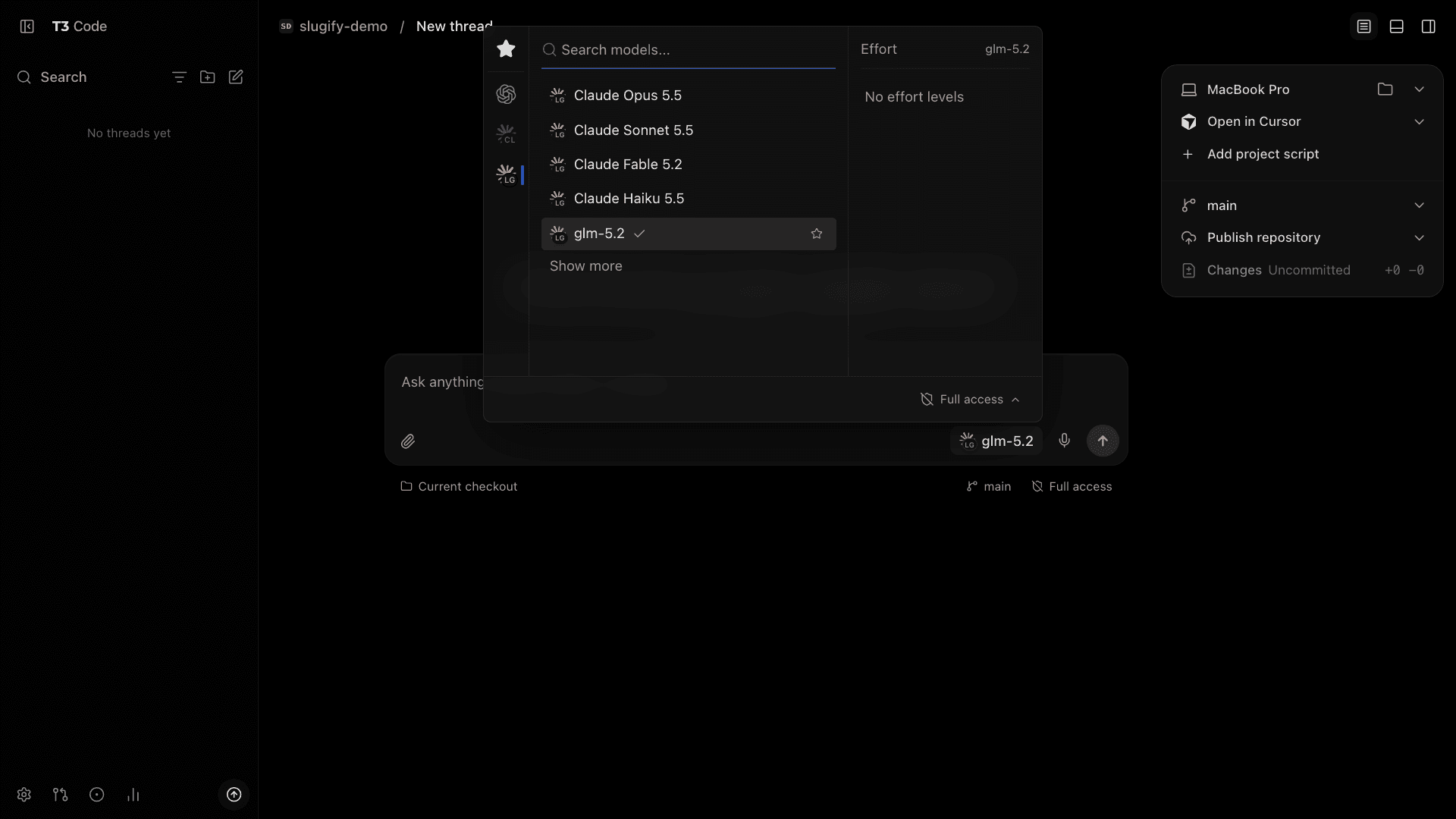
Then ask for a specific fix and a way to check it. This prompt comes from the demo project, so replace the file and the test command with your own:
Fix slugify.ts so all tests pass. Read the files, make the smallest fix,
run node --test slugify.test.ts, and summarize. Do not edit the tests.
By default, new threads use Full access, which runs commands and edits without prompts. Switch the thread to Supervised in the composer to approve each command and file change.
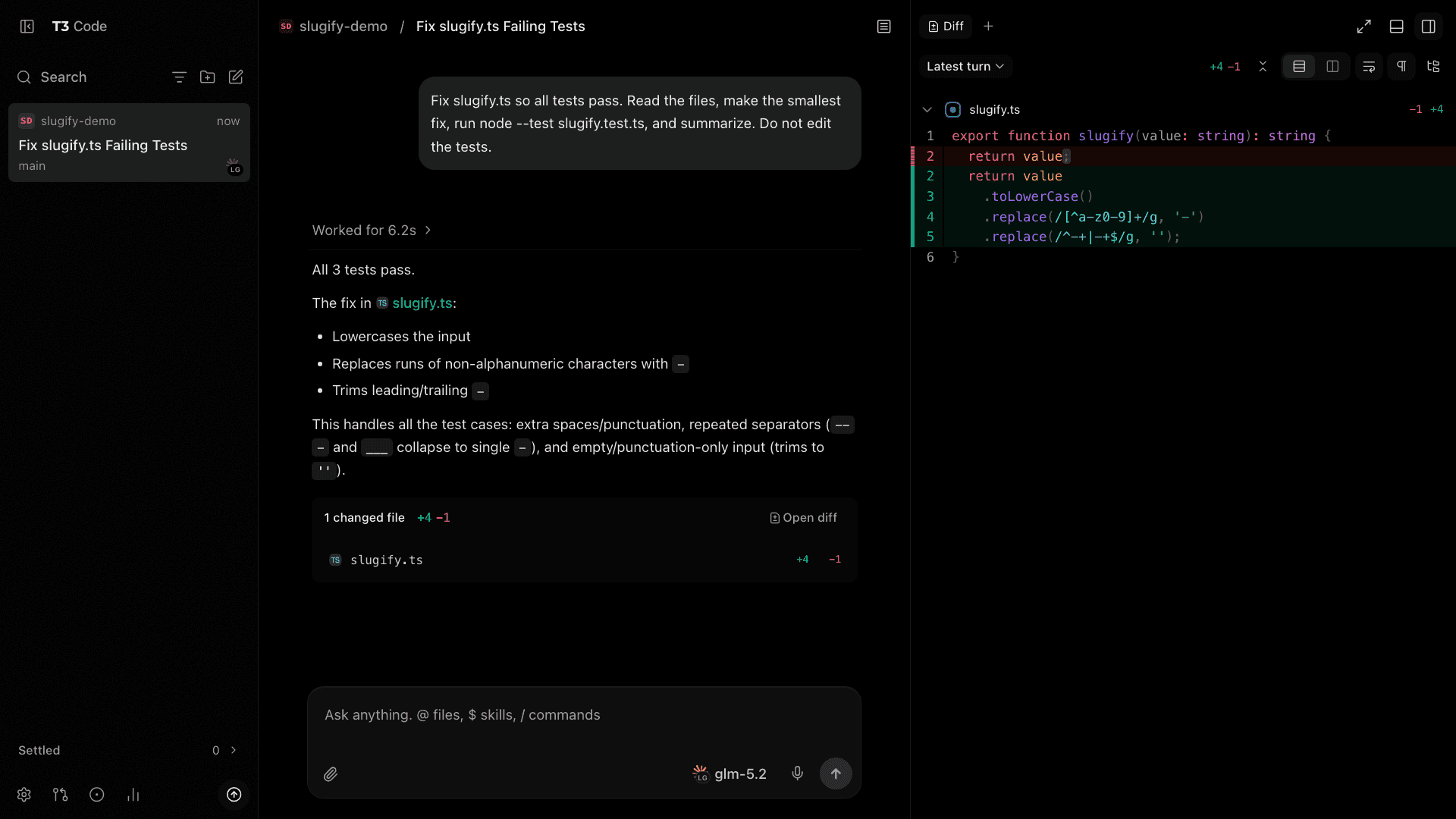
When the turn finishes, click Open diff to review the change before you commit it. Then open your LLM Gateway dashboard, select the project that issued the key, and open Activity to see the request's model, tokens, and cost.
Use Codex or OpenCode instead
T3 Code passes an instance's environment variables to Codex and OpenCode in the same way. The same task also passed through both, with Codex CLI 0.159.0 and OpenCode 1.18.29.
- OpenCode: click Add provider, choose OpenCode, and set
LLMGATEWAY_API_KEYin the new instance's Environment variables. The model picker then lists the catalogue under LLM Gateway and DevPass (LLM Gateway). The OpenCode guide covers its own configuration. - Codex: create a directory such as
~/.codex_llmgatewayand save the provider block from the Codex CLI guide asconfig.tomlinside it. Click Add provider, choose Codex, then Configure manually, and set theCODEX_HOMEpath to that directory. Then setLLMGATEWAY_API_KEYin the instance's Environment variables and pick a model that exists in the catalogue. GPT-5.6 Terra from the built-in list passed the task.
Troubleshooting
The instance shows Not found
T3 Code cannot find the claude binary. Install Claude Code, check claude --version in a terminal, then click Refresh provider status.
The instance shows Not authenticated
ANTHROPIC_BASE_URL is missing, was not saved, or does not start with https://. Enter https://api.llmgateway.io, then click Refresh provider status.
A thread shows Retrying provider, then a 401 error
The key is wrong or revoked. The instance status does not check it. Enter a current LLM Gateway key in ANTHROPIC_AUTH_TOKEN, then start a new thread.
Requests still use your Anthropic account
The thread is running on the default Claude instance. Open the model picker and select a model under LLM Gateway.
Model not found
Copy the exact ID from the model catalogue into Add custom model. On DevPass, remove any upstream provider prefix.
The agent stops early or prints raw tool-call text
Claude Code depends on reliable tool calls. Switch the thread to another tool-capable model from the catalogue.
Codex reports a missing environment variable
A Codex session that started before you saved LLMGATEWAY_API_KEY keeps its old environment. Restart T3 Code, then start a new thread.
How is this guide?
Last updated on